
RDP stands for Remote Desktop Protocol (that is the full form of RDP). It's Microsoft's technology for using a Windows computer somewhere else as if you were sitting in front of it. You see its desktop on your own screen, and your keyboard and mouse control it. The computer can be in the next room, or in a data center on another continent.
When people say "buy an RDP" or "I need an RDP", they usually mean something slightly different: a Windows server, rented from a hosting company, that you log in to over Remote Desktop. This guide covers both meanings, what people use RDP for, how to connect from any device, and how to tell which kind of RDP you need.
RDP Meaning: What It Means in Everyday Use
The word "RDP" gets used in three ways:
- The protocol. The set of rules Microsoft built into Windows that sends a computer's screen to you and your clicks and keystrokes back to it.
- The app. Remote Desktop Connection, the program built into Windows that you use to connect. On Mac, iPhone, iPad and Android, Microsoft's app is called Windows App (it used to be called Microsoft Remote Desktop).
- A remote server. "An RDP" usually means a Windows computer in a data center that you rent by the month and use through Remote Desktop. It stays on 24 hours a day, has a fast internet connection, and gives you an IP address in the country where it's hosted.
If someone in a trading group or a freelancing forum tells you to "get an RDP", they mean the third one.
How Remote Desktop Protocol Works
RDP connects two machines: the client (the device you're holding) and the host (the Windows computer you want to use).
- You open a Remote Desktop app and type the host's address, for example an IP address like 203.0.113.10.
- The app reaches the host over the internet. By default, Windows listens for Remote Desktop on port 3389.
- You sign in with a Windows username and password for that host.
- The host sends you a live picture of its desktop. Every click, keystroke and scroll you make goes back to the host, which does the actual work.
The important part is step 4: all the work happens on the host. If you start a big download, it uses the host's internet connection, not yours. If you run trading software, it keeps running on the host after you disconnect. Your own device only shows the picture, so even an old laptop or a phone can use a powerful server.
RDP also carries more than the screen. It can pass through copy and paste, sound, printers, and your local drives, so you can move files between your PC and the remote computer.
What People Use RDP For
- Trading around the clock. Forex and crypto traders run MetaTrader 4, MetaTrader 5 or trading bots on an RDP so they keep running when their own PC is off or their power goes out. A server in New York or London also sits close to many brokers' trading servers.
- Running apps and bots 24/7. Scrapers, social media tools, automation scripts and long downloads keep going on a server that never sleeps.
- A fast connection and a foreign IP. A server in the US or UK has a data-center internet connection and a local IP address. That helps with US or UK websites and tools that expect visitors from those countries.
- Working from any device. You can reach the same Windows desktop, with all your programs and files, from a cheap laptop, a Mac or a phone.
- Keeping work off your own PC. Files and software live on the server, so a lost, stolen or broken laptop doesn't take your work with it.
- Remote support and IT work. Administrators use Remote Desktop to manage servers and help users without travelling to them.
How to Connect to an RDP
You need three things: the server's address, a username and a password. Your hosting provider sends these when your server is ready. For more detail, see our step-by-step RDP connection guide.
From Windows
- Press Win + R, type
mstscand press Enter. Remote Desktop Connection opens. - Click Show Options to see all the settings.
- Type the server's address in Computer.
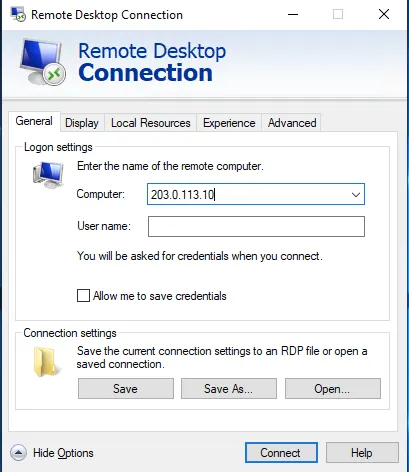
- Type your username in User name and click Connect.
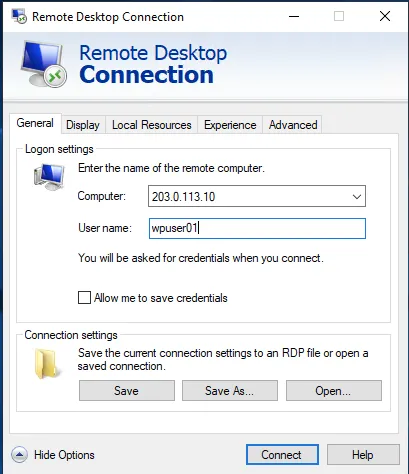
- Enter your password when asked and click OK.
- If Windows warns that it can't verify the server's identity, check the address is right and click Yes. This is normal the first time you connect to a new server.
The remote Windows desktop then opens in the window:
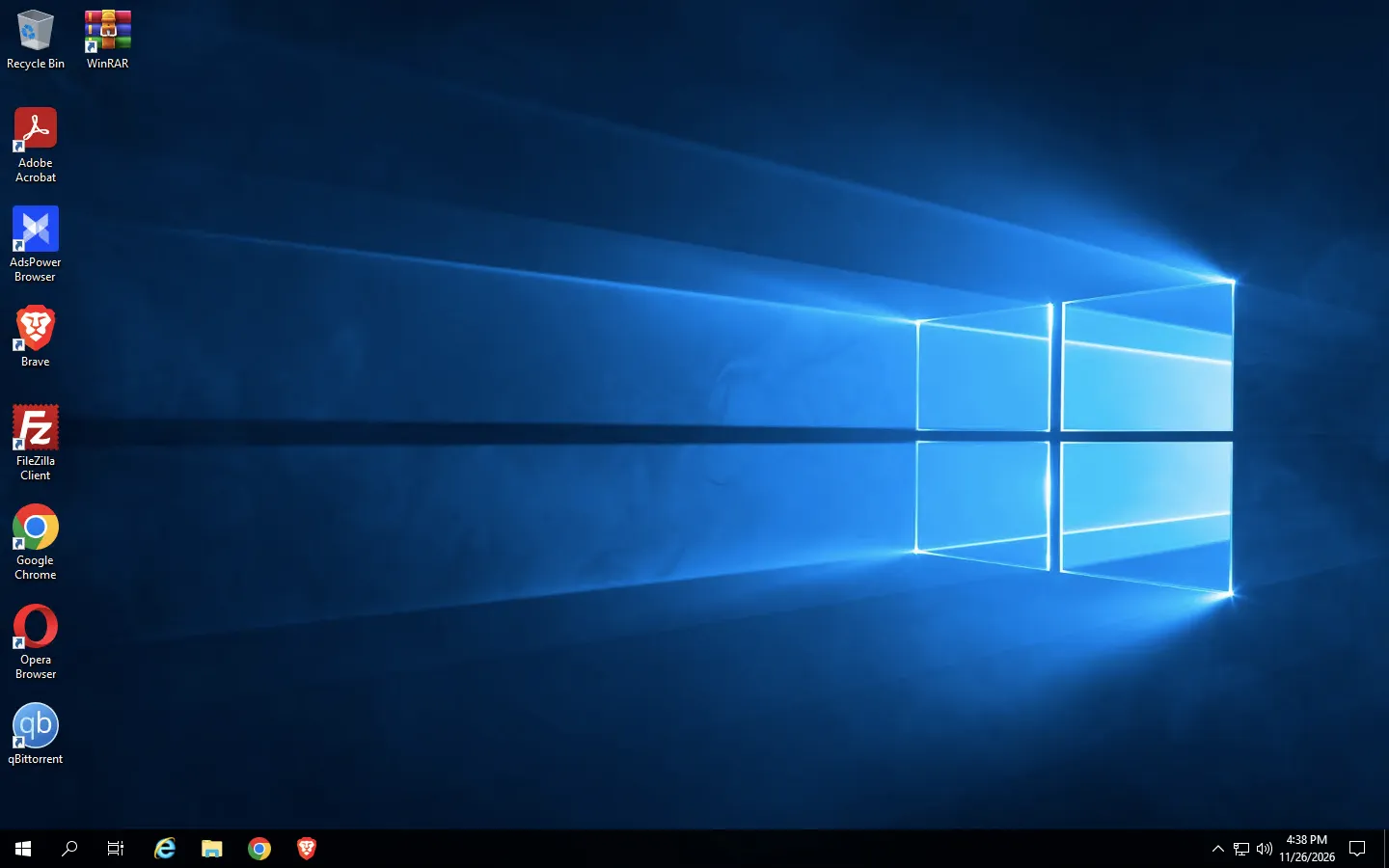
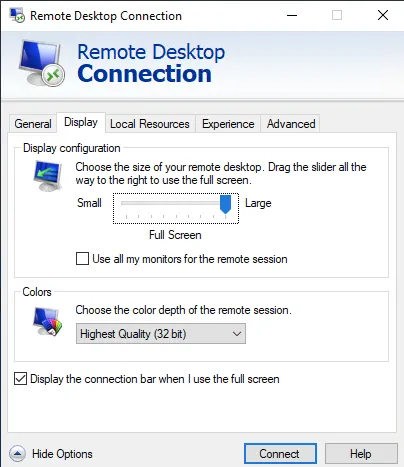
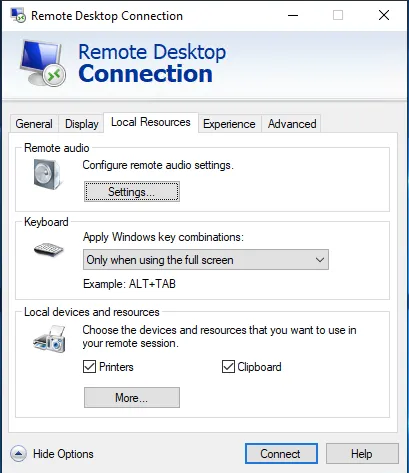
Two tabs are worth a look before you connect. Display sets the window size and colour quality; lower settings feel faster on a slow connection. Local Resources controls whether copy and paste, sound, printers and your local drives work inside the session.
From a Mac, iPhone, iPad or Android phone
- Install Windows App from the App Store or Google Play. It's free and made by Microsoft.
- Tap + and choose Add PC.
- Enter the server's address, then add your username and password.
- Tap the new PC to connect.
On Linux, use a free client such as Remmina.
RDP vs VPN vs VPS
These three get mixed up a lot.
| RDP | VPN | VPS | |
|---|---|---|---|
| What it is | A way to use another computer's desktop | An encrypted tunnel for your own internet traffic | A virtual server you rent, with its own resources |
| Where your apps run | On the remote computer | On your own device | On the server |
| What you see | The remote computer's full desktop | Your own screen, as normal | A desktop (Windows, over RDP) or a command line (Linux) |
| Good for | Using a remote Windows machine | Privacy, or reaching a private network | Running your own software and services 24/7 |
The short version: a VPN changes where your own traffic appears to come from, but your apps still run on your device. With RDP, the apps run on the other computer. A Windows VPS is one of the computers you might connect to with RDP. More on that in RDP hosting vs VPS hosting.
Is RDP Safe?
RDP itself encrypts the connection between you and the server. The risk comes from weak setups. Because port 3389 is well known, bots try to guess passwords on any Windows machine they find with it open. To stay safe:
- Use a long, unique password. Twelve characters or more, not used anywhere else.
- Keep Windows updated. Most serious RDP attacks used security holes that updates had already fixed.
- Change the default port on a server you control, so fewer bots find it. Add the new firewall rule before you switch, or you can lock yourself out.
- Avoid free or "cracked" RDPs. A server someone else controls can record everything you type, including passwords and wallet keys.
- Buy from a provider you can reach. You want support that answers and a refund policy if something goes wrong.
Shared RDP vs Admin RDP: Which One Do You Need?
Rented RDPs come in two kinds:
- Shared RDP. Your own Windows login on a powerful server shared with other users. It's the cheapest option and works well for browsing, office work, social media tools and file transfers. You can't install software yourself or change system settings. Our cheap SSD RDP starts at $3.99 a month in France.
- Admin RDP. A private Windows server with full administrator rights. You can install anything (MetaTrader, bots, custom apps), change settings and restart it whenever you like. Our USA RDP plans offer admin access as an add-on, and our Windows VPS includes it on every plan, from $12 a month.
If you only need a Windows desktop with a fast connection, start with shared RDP. If you need to install your own software, choose admin access.
All our RDP and VPS plans come with a 48-hour money-back guarantee, and you can pay by card, PayPal, UPI or crypto, including USDT. Ready to start? Buy RDP from WebPundits.
Frequently Asked Questions
What is the full form of RDP?
RDP stands for Remote Desktop Protocol. It is Microsoft's technology for controlling a Windows computer over a network or the internet.
What is RDP used for?
RDP is used to control a Windows computer from somewhere else. People use it to run trading software and bots 24/7, work from any device, get a fast connection with a US or UK IP address, and manage servers remotely.
Is RDP like a VPN?
No. A VPN routes your own internet traffic through another server, but your apps still run on your device. RDP shows you another computer's desktop, and your apps run on that computer.
Is RDP better than SSH?
They do different jobs. RDP gives you a full graphical Windows desktop. SSH gives you a text command line, mostly on Linux servers. Use RDP for Windows programs, and SSH for managing Linux servers.
Why do I have Remote Desktop Connection on my PC?
It's built into every version of Windows so you can connect to other computers. Windows Home can connect out to other machines, but only Pro, Enterprise and Server editions can accept incoming Remote Desktop connections.
Is RDP free?
The Remote Desktop apps are free. What costs money is the computer you connect to: either your own PC (free, but it must stay on) or a rented server, which starts at a few dollars a month.